How to Get Glitter Out of a Shag Carpet
Updated: August 27, 2026 • By Lena Shore
Filed under: Design Do-Over Diary, Humor, Web Design

Is this gum?
Don’t hire someone to build your website. Hire someone to finish your website.
The web developer’s own website is always the worst website. I’d like to tell you that isn’t true about mine. I’d like to tell you a lot of things.
It isn’t laziness. It’s just that my website has never once sent me a check. Clients do though. So when I have to choose between the thing that pays and the thing that doesn’t, I choose the thing that pays. Then I do that four hundred more times. Then it’s a few years later.
This is not my first website. It isn’t my third. I’ve rebuilt my site from scratch many times, and renovated it heavily in between. Renovating is faster, but each time you do it, you leave a little bit of the previous version… like layers of old paint or baseboard dust that you painted over instead of cleaning properly because this whole thing took two days vs the 2 hours you promised your better half and he’s giving you the side-eye at the end of day two and you are exhausted. Or so I’ve heard.
A few weeks ago I decided it was finally time.
I started with the header.
Easy Peasy
The header had been bugging me for a while. Phone number, contact link, blog, search — all of it isolated in a skinny bar at the top, in colors I had chosen on purpose, for reasons I no longer had access to.
And I kept forgetting the contact link was up there.
Me. The person who built the site. Who knows it better than any living human. I would go looking for my own contact page and my eyes would slide right past it.
Here’s a free rule: when you can’t find something on your own website, that’s not a you problem.
Twenty minutes. Moved it, fixed the contrast, done. Not perfect, but the friction was gone and I felt pretty good about whacking that mole.
Then I fell down the mole hole. Yes, that’s a thing now.
The Sitemap
I decide to review the sitemap as It might want a little attention. My sitemap generates itself, which I had always filed under “win.”
It was not a win. It was an unsupervised list of past decisions. There were a dozen pages on it I had completely forgotten existed, including a test page. Of course a test page. Every site has a test page. Why is it here? My eyes are rolling in the back of my head.
Then there was an entire section I started building years ago, got busy, changed course, and never finished — sitting out there in public, half-built, patiently waiting for someone to wander in.
And a page from a client project that ended two years ago. Broken, pointing at files that no longer exist, and perfectly public.
Kill me now.
Nothing on it was catastrophic. All of it was live. Every one of those pages was something Google had been cheerfully offering to strangers on my behalf for years while I sat three feet away doing nothing about it.
I know ya’ll thought I was perfect. I’m sorry to be the one to tell you.
There is Only One of Me
Yet, there were two Contact pages. Two. Different. Web pages. Both real. Both live.
And this is where it stopped being funny, because I realized what I’d actually been looking at with the header. The navigation pointed at one contact page. Every button in the footer pointed at the other one. So there was never a single place my brain could file as the contact page.
Kill me now. Again.
From the inside, a design problem and a structure problem can feel exactly the same. Something is annoying. You can’t say why. So you adjust the thing you can see — the color, the size, the spacing — and it never quite fixes it, because the thing that’s broken isn’t the part you’re looking at.
The extra page is now gone. Anyone who still has the old link gets forwarded to the right one automatically — the internet’s version of a change-of-address card.
Is That Gum?
I got a report that there was a wrong phone number on my website.
I looked. Header, right number. Footer, right number. Contact page, right number. I moused over everything like I was searching couch cushions for car keys.
There was no wrong phone number. Wait a minute…is this gum?
It was sitting in a block of code set to invisible by shoving it 2000px off to the left of the screen — an SEO trick from an era when that sort of thing worked, put there by a version of me who was evidently very pleased with herself. It had a phone line in it. The line had been dead for years.
UGH. This IS gum.
I couldn’t see it. Not on any screen, at any size, in any browser. I owned it, I’d written it, and I could not find it with my own eyes.
Google could see it perfectly.
The parts of your website you can’t see are still your website. They’re still making claims about your business. They’re just making them to an audience that never tells you when you’re wrong.
Here’s What I Tell Clients
When a site is in this shape, my advice is almost always the same: don’t renovate. Build fresh.
It’s cheaper. There’s no excavation, no archaeology, no afternoon spent reverse-engineering what a previous version of you was thinking at eleven at night in 2019. You decide what you need now, you build that, you launch it.
I am not doing that.
Why Not
Because the determining factor isn’t how much glitter is in the shag carpet of your website. It’s who’s doing the work, and whether they can finish.
A separate development build only pays off if somebody constructs it in one contained stretch and flips it live. That’s the actual product when you hire someone — not the code. It’s the finishing of the thing. Don’t hire someone to build your website. Hire someone to finish your website.
If it gets worked on between other things, “finished” keeps sliding backward. And in the meantime you are maintaining two websites instead of one. Every fix happens twice. Every update happens twice. You will do this for a while, and then you will get busy, and then you will have a stale half-built site sitting in a development area being of no use to anyone. And you won’t remember where you were.
I am the only client on earth who would put up with that arrangement.
Eventually, I fired that version of me and hired another version of me that is going to do this in little chunks.
Header. Then the sitemap. Then review the content. Then the design. Break it down by page. You get the idea. Each task is small enough that I can actually finish it between real jobs.
So Which One Are You?
Rebuild if the structure is wrong and your business has really evolved past what your website describes. Rebuild if you’ve outgrown the platform, or it’s fighting you. Rebuild if the site has a poltergeist you can’t evict.
Renovate if the bones are fine and specific things are broken. The nav, the footer, a section that quietly grew weeds.
And here’s the part where I talk myself partway out of a sale, because I’d rather you heard it from me: if you aren’t the one doing the work, rebuilding is usually cheaper. Renovation always costs more hours than it looks like it will, because a solid chunk of those hours goes into figuring out what the last person was thinking. That’s billable. I’d just rather you know that going in than find out on an invoice.
You don’t get all the glitter out of a shag carpet. Nobody does. You get it out of the part people actually walk on, and then you do it again in six months, and one day you’ll find a piece of it stuck to a coaster and wonder what year it’s from.
A good website is never done. It’s a living document. If yours hasn’t changed in years, it probably isn’t because nothing needed changing. It’s because nobody was looking.
While I was writing this paragraph I found out my privacy policy page had been carrying the wrong title in search results this whole time. I’d renamed the page. The title didn’t come with it.
Ugh. Told you a website is never done.
Go Do These Three Things
They’re free, they take five minutes, and everybody finds something.
-

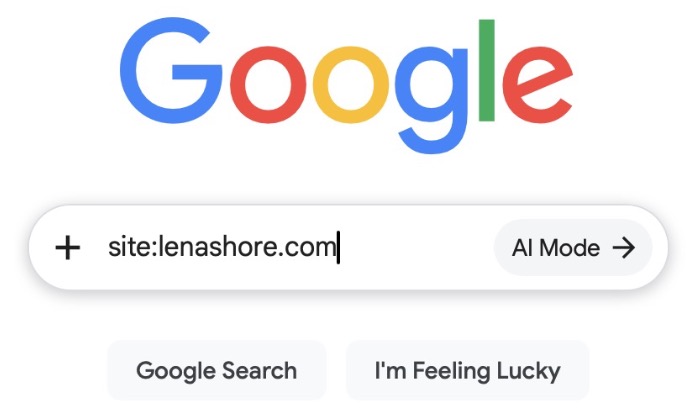
Find all the pages on your site in Google
Ask Google what it has on you. site:yourdomain.com — every page it’s indexed. Scroll to the end. If your site has a sitemap link in the footer, read that too, but Google’s list is the honest one.
- Now Google your business name. Read what comes back the way a stranger would. Not proudly. Suspiciously.
- Test your own contact form. Fill it out. Hit send. Make sure it lands in an inbox you actually open, and not a spam folder you check twice a year.
Do that last one even if you skip the other two. Do it especially if you’re certain it works. I had a conversation about this recently that I would prefer not to repeat.
Lena Shore builds custom WordPress websites, does graphic design and illustration, and has recently discovered several things about her own website that she would rather not discuss. This is part one of the Design Do-Over Diary. There is more. There is so much more.
